Hall of Fame Taxonomy Guide: Standardize Sports, Awards, Teams, and Eras
- Home /
- Digital Wall of Fame Blog - Recognition Display Insights & Resources /
- Hall of Fame Taxonomy Guide: Standardize Sports, Awards, Teams, and Eras

The Easiest Touchscreen Solution




Live Example: Rocket Alumni Solutions Touchscreen Display
Interact with a live example (16:9 scaled 1920x1080 display). All content is automatically responsive to all screen sizes and orientations.
A hall of fame taxonomy is the controlled set of category labels—sport names, award types, team identifiers, and era definitions—that your program applies consistently to every inductee record. Without one, a recognition program that spans forty years can accumulate dozens of conflicting labels for the same thing: “Boys Basketball,” “Men’s Basketball,” “Basketball (M),” and “BKB-Boys” all describing the same sport in the same database. Visitors can’t filter by sport, administrators can’t pull clean reports, and migrating to a new display platform requires a manual clean-up pass through hundreds of entries before the data is usable. Building a documented taxonomy once—and maintaining it—costs far less than correcting inconsistency across a decade of inductions.
A well-built taxonomy makes your hall of fame content browsable by anyone: a prospective student searching for athletes in their sport, an alumnus looking for inductees from a specific era, or a facilities manager auditing which teams have representation. Standardized labels are the foundation that makes every other improvement to a recognition program—richer profiles, digital search, multi-device display—actually function at scale.

Consistent categorization makes a hall of fame browsable by sport, era, and award type—whether the display is physical, digital, or both
The Four Core Taxonomy Dimensions
Most school athletic halls of fame need to classify inductees and entries across four dimensions. Each dimension should have a defined set of allowed values—no free-text, no synonyms, no abbreviations that only one staff member understands.
| Dimension | What It Classifies | Common Problem Without It |
|---|---|---|
| Sport | Which athletic discipline the inductee is honored under | “Soccer,” “Women’s Soccer,” “Girls Soccer,” “Varsity Soccer,” and “Soccer (F)” all appearing for the same sport |
| Award / Honor Type | Whether the entry is an Athletic Award, Academic Award, Service Award, Championship Team, Special Honor, etc. | Mixing individual inductees with team banners and coaches of the year into a single unsorted list |
| Team / Program | The specific program or organization within the sport (varsity, JV, junior program, coaching staff) | Inductees from the same sport appearing under inconsistent program labels that break filtering |
| Era | The time period associated with the inductee’s achievement | Decade labels colliding with coach-era labels, making chronological browsing unreliable |
These four dimensions work together. A given inductee entry might be: Sport = Women’s Track & Field, Award Type = Individual Athlete, Program = Varsity, Era = 1990–1999. Every combination should be computable from the stored labels without ambiguity.
Step-by-Step: Building Your Hall of Fame Taxonomy
Step 1: Inventory What You Already Have
Before defining new labels, document every value currently in use. Export your inductee database or review your physical record cards and list every sport name, award type description, and year-range label that appears. Group near-duplicates together. This inventory reveals the scope of the inconsistency and informs which canonical terms are already most common.
Step 2: Define Your Sport List
Create a master sport list that covers every athletic discipline your program has honored, past or present. Apply these principles:
- Use the official school or conference name where one exists. If your athletic department calls it “Cross Country,” that is the canonical term—not “CC,” not “XC,” not “Distance Running.”
- Include gender or division only when it is a separate inductee pool. If your hall of fame has a combined pool that includes all genders, add a gender field separately rather than encoding it in the sport name. If the pools are separate by design, include the qualifier in the sport name consistently: “Women’s Basketball” and “Men’s Basketball,” not a mix of “Women’s Basketball” and “Boys Basketball.”
- List discontinued sports explicitly. A sport that ended in 1988 still appears in your inductee records. Create the label anyway: “Men’s Wrestling (Discontinued 1988)” or, cleaner, just “Men’s Wrestling” with a program-level note about discontinuation. Erasing the sport label from the taxonomy does not erase the inductees—it just makes them unsortable.
Award category frameworks developed for team recognition programs offer a useful parallel to athletic taxonomy design, especially when defining how to separate individual, team, and organizational honors at the category level.
Step 3: Define Award / Honor Type Categories
Award types distinguish what an entry represents, not which sport it belongs to. A clean four-level structure covers most school programs:
| Award Type | What It Covers | Examples |
|---|---|---|
| Individual Athlete | A single person inducted for athletic achievement | Inductee who set a conference record, earned All-State status, or demonstrated exceptional career performance |
| Team / Championship | An entire team cohort honored for a specific season | State championship team, undefeated season, conference title team |
| Contributor / Coach | Coaches, administrators, trainers, or support staff honored for program-building contributions | Head coach with a significant win record, long-serving athletic trainer, booster organization leader |
| Academic / Scholar-Athlete | Inductees honored specifically for combining athletic and academic achievement | Scholar-athlete award winners, those maintaining a defined GPA standard alongside athletic participation |
| Special Honor | Entries that don’t fit neatly into the above categories | Program milestone honorees, memorial recognitions, retired numbers or jersey retirements |
Resist creating award types that overlap. If a coach also played for the program and is being inducted as an athlete, the correct award type is Individual Athlete—add a note about the coaching career in the profile text rather than creating a hybrid category label.
Standardizing how ballot categories are defined before voting is one of the most effective ways to ensure that inductee records inherit consistent category labels from the moment of induction rather than requiring retroactive clean-up.
Step 4: Establish Your Era Definitions
An era label groups inductees by time period for browsing and reporting. Three approaches are common:
Decade-Based Eras The simplest approach: 1960–1969, 1970–1979, and so on. Easy to explain, requires no interpretation, and works regardless of institutional changes. The main limitation is that decades don’t align with meaningful program boundaries—a coach who transformed the program from 1973 to 1991 spans three decade labels.
Coaching or Administration Eras Labels tied to the tenure of a significant coach or administrator: “The Rivera Era (1978–1995),” “Post-Championship Expansion (1996–2006).” This approach is meaningful to alumni who experienced those eras directly, but it creates maintenance complexity when eras need to be redrawn, renamed, or extended as the program history grows.
Facility or Conference Eras Labels tied to facility milestones or conference affiliations: “Original Gymnasium Era,” “Current Athletic Complex Era,” “Conference Realignment Era.” Useful when physical spaces or competitive contexts mark genuinely distinct program periods, but less intuitive to visitors who don’t know the facility timeline.
Recommendation: Start with decade-based eras as your primary filter. Add named eras as supplementary labels if your program has a strong coaching or facility history that alumni identify with. Do not use named eras as the only label—a visitor who doesn’t know when “The Harrington Era” occurred cannot use that label to browse.
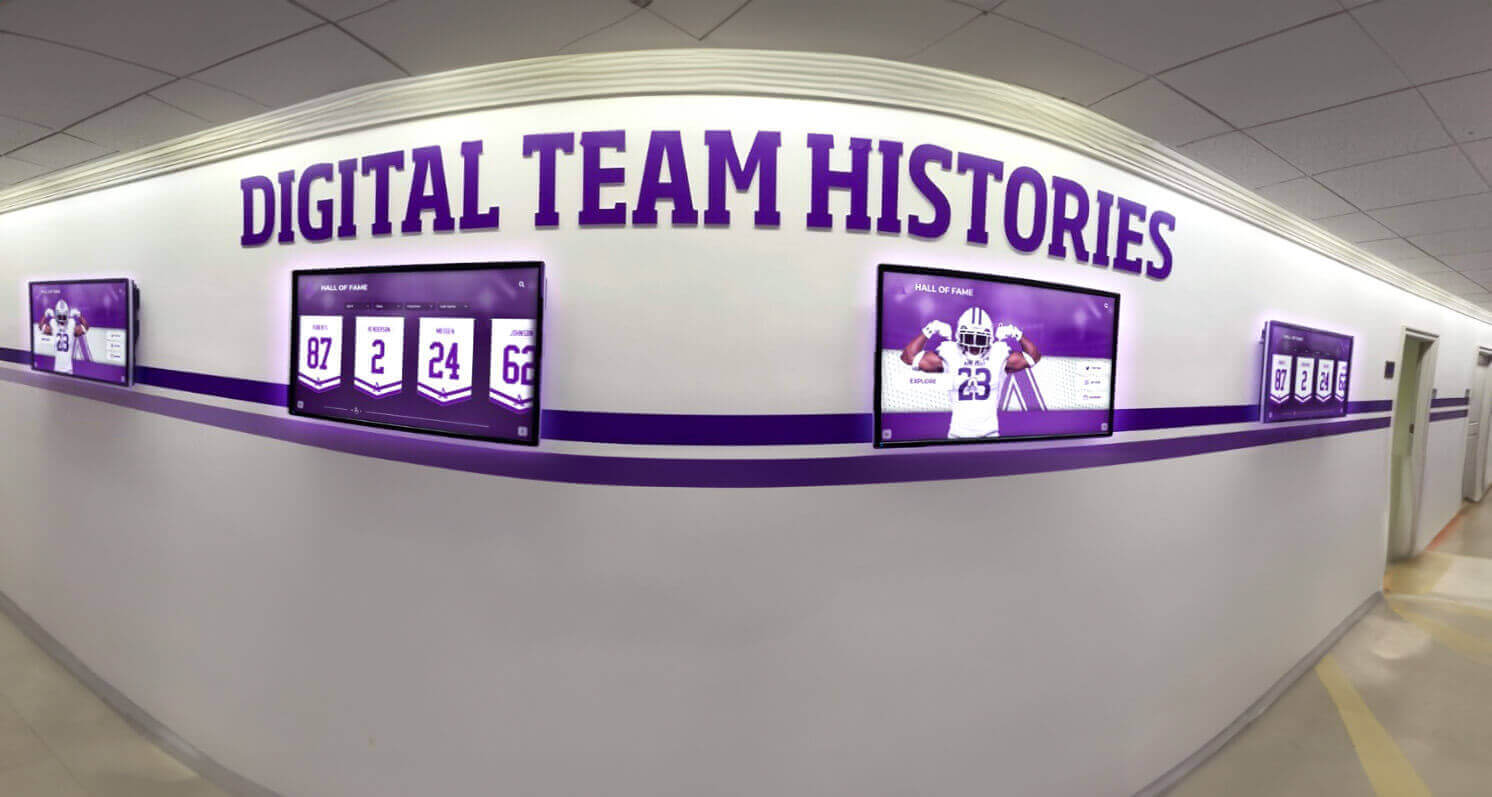
Era-based browsing lets visitors navigate a hall of fame chronologically—a touchscreen display can expose this as a timeline filter that decade-labeled records power automatically
Step 5: Define Program / Division Labels
Within a sport, different program levels may be honored separately. Define which levels your program recognizes:
- Varsity – the most common level honored; if you only honor varsity, this label may be implicit rather than required
- Junior Varsity – if JV achievements are ever recognized, label them explicitly to avoid confusion with varsity records
- Program / School – for team entries that represent the overall program rather than a single season
- Coaching Staff – when an entire coaching unit is honored collectively rather than individual coaches
Step 6: Document the Controlled Vocabulary
A taxonomy is only useful if it is written down and accessible to every staff member who enters data. Create a single reference document—one page is sufficient—that lists:
- The allowed values for each dimension, in their exact canonical form
- Brief definitions and examples for any value that might be misunderstood
- A rule for handling cases not covered by an existing label (typically: flag for committee review before creating a new label)
- The name of the person responsible for updating the taxonomy when program changes require it
Store this document where future staff will find it: in the hall of fame committee’s shared folder, in the CMS administrator guide, and in the program’s governance binder.
Step 7: Apply the Taxonomy to Existing Records
With the taxonomy documented, work through existing inductee records systematically:
- Export a full list of current entries with every existing tag or category.
- Map old labels to new canonical labels using a lookup table. Spot-check for edge cases before bulk-applying.
- Flag records that require human judgment—inductees who crossed multiple sports, team entries from programs that no longer exist, or records with missing date information that prevents era assignment.
- Apply the mapped labels to the database or CMS records. If your display platform allows bulk edits, this takes a single session. If not, work inductee-by-inductee with a documented review checklist.
- Review for consistency by running a summary report: how many entries appear under each sport label? Do any labels have unusually small counts that suggest a merge was missed?
A comprehensive overview of wrestling hall of fame structures and award categories illustrates how even a single-sport program benefits from defined award type and era labels once the inductee count grows past a few dozen entries.
Step 8: Build the Taxonomy Review into Your Annual Cycle
A taxonomy drifts when new inductees are added without enforcement. Build taxonomy consistency into your induction workflow:
- Nomination forms should include a dropdown or checkbox for sport, award type, and era—not a free-text field
- New inductions are assigned canonical labels before the record is published, not afterward
- Annual review (align this with your post-induction audit) checks whether any new values appeared that weren’t in the controlled vocabulary and either maps them to existing labels or proposes a formal taxonomy update
Aligning hall of fame programs with broader state and regional recognition contexts is also useful when defining sport taxonomy labels, since regional name conventions (especially for state-championship sports) often provide a neutral standard that alumni from multiple eras recognize.
Naming Convention Reference Tables
Use the following tables as a starting point. Adapt labels to your institution’s actual terminology.
Sport Name Standardization
| Canonical Label | Common Variants to Retire |
|---|---|
| Men’s Basketball | Boys Basketball, Basketball (M), BKB-M, Varsity Basketball Boys |
| Women’s Basketball | Girls Basketball, Basketball (F), BKB-F, Lady Panthers Basketball |
| Football | Varsity Football, HS Football, Gridiron |
| Men’s Soccer | Boys Soccer, Soccer (M), Soccer-Male |
| Women’s Soccer | Girls Soccer, Soccer (F), Lady Eagles Soccer |
| Baseball | Varsity Baseball, HS Baseball |
| Softball | Varsity Softball, Girls Softball |
| Men’s Track & Field | Boys Track, Track (M), Track & Field Boys |
| Women’s Track & Field | Girls Track, Track (F), Girls Cross Country-Track |
| Wrestling | Varsity Wrestling, HS Wrestling |
| Swimming & Diving | Swimming, Swim Team, Pool Sports |
| Volleyball | Girls Volleyball, Volleyball (F) (adjust if your program also honors men’s volleyball) |
| Cross Country | CC, XC, Distance Running |
| Golf | Varsity Golf, Golf (M/F) (if combined pool) |
| Tennis | Varsity Tennis, Tennis (M/F) (if combined pool) |
Award Type Standardization
| Canonical Label | Common Variants to Retire |
|---|---|
| Individual Athlete | Athlete Inductee, Player, Athlete of the Year, Inductee |
| Team / Championship | Team Inductee, Championship Team, Title Season, Undefeated Season |
| Contributor / Coach | Coach, Support Staff, Builder, Non-Athlete |
| Academic / Scholar-Athlete | Scholar-Athlete, Academic Excellence, Academic Award, GPA Honoree |
| Special Honor | Memorial, Legacy, Tribute, Retired Number, Special Recognition |
Era Standardization (Decade Model)
| Canonical Label | Format Rule |
|---|---|
| 1960s | Use four-digit year + “s”: 1960s, 1970s, 1980s |
| 1970s | Apply to the decade in which the achievement occurred, not the induction year |
| 1980s | For team entries: use the decade of the championship season |
| 1990s | For coaches: use the decade their tenure began or split across decades with a note |
| 2000s | Avoid “Early 2000s,” “Late 90s,” or other imprecise descriptors |
| 2010s | |
| 2020s |
Applying the Taxonomy on a Digital Touchscreen Display
A taxonomy built in a spreadsheet becomes genuinely powerful when it drives filtering and search on an interactive display. A touchscreen hall of fame with well-labeled records allows visitors to:
- Filter by sport to see every Women’s Soccer inductee across all years
- Browse by era to explore who was honored during a specific decade
- Sort by award type to distinguish individual athletes from championship teams and contributors
- Search by name and see the inductee’s labeled sport and era alongside their profile
Touchscreen platforms that support this kind of filtered navigation—with unlimited inductees, cloud-based CMS updates, and auto-ranking record boards—make taxonomy investment immediately visible to visitors. The complete guide to wrestling hall of fame award display structures demonstrates how consistent sport and award-type labels translate directly into browsable category menus on an interactive display.
Learn more about Rocket Alumni Solutions’ Digital Wall of Fame platform to see how cloud-based content management supports structured taxonomy fields, filtered browsing, and ADA WCAG 2.1 AA–compliant navigation across unlimited inductee records.
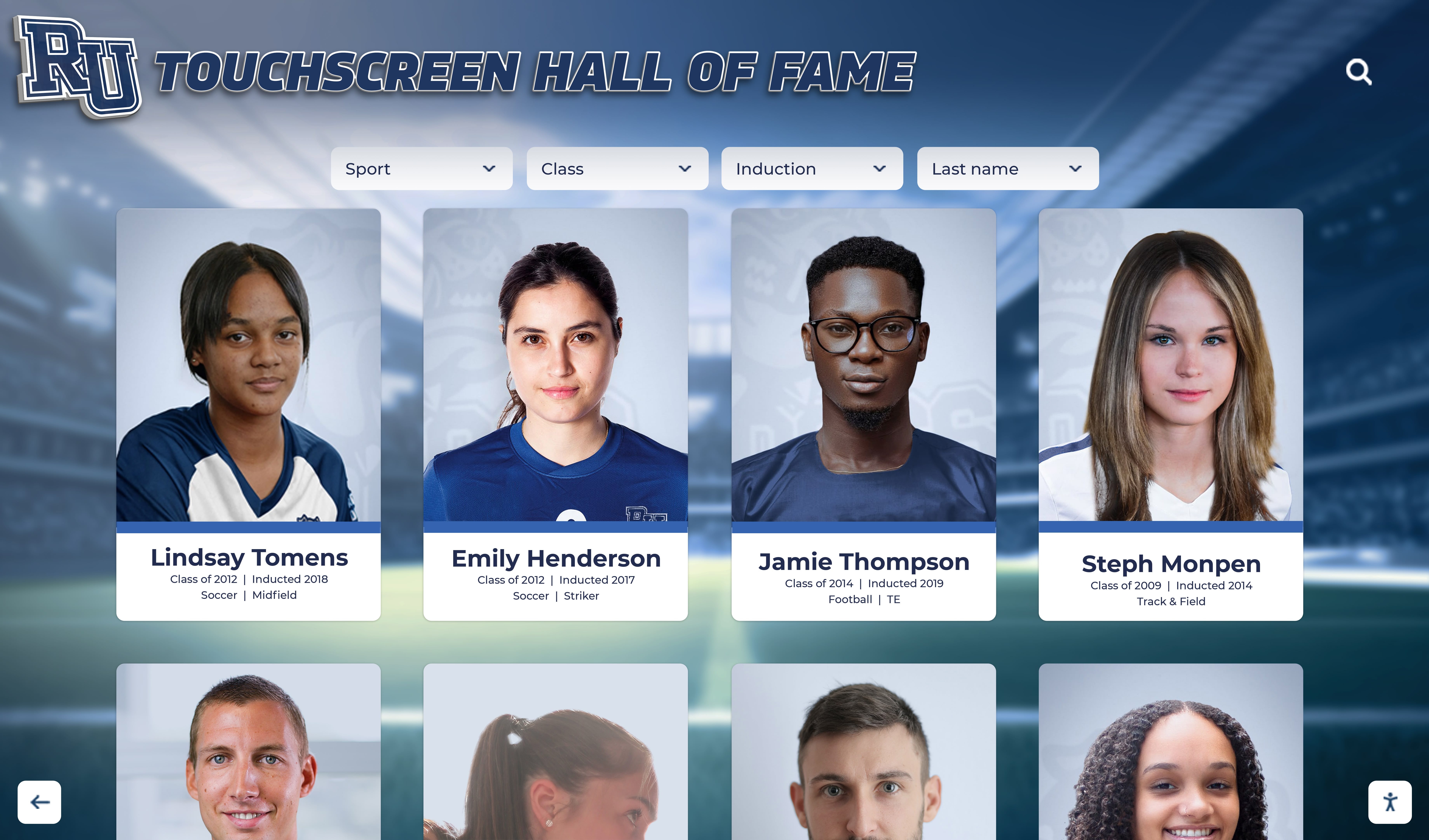
Structured taxonomy labels power the category filters and browsable views visitors use on an interactive touchscreen hall of fame display
An important operational benefit: when your taxonomy is consistent, migrating to a new display system or adding a QR-code mobile access layer requires no data clean-up. The records are already structured correctly. Schools that skip this foundation often discover the cost of inconsistency only when they attempt a migration and find that the work to clean up a decade of free-text sport labels outweighs the effort to build the taxonomy correctly in the first place.
Award category structures used in donor and recognition wall programs offer additional cross-reference value when schools want to align their hall of fame taxonomy with other recognition programs on campus, ensuring that the same individual’s contributions appear consistently across every display context.
Frequently Asked Questions
Q: How granular should sport categories be?
A: Match the granularity to your actual inductee pool. If you have fifteen inductees in a combined “Track & Field / Cross Country” category, split them only if your program already treats those sports as separate. If you have two inductees who ran cross country and were primarily nominated for that, create the separate label. If only one inductee across thirty years ran cross country and they are already in “Track & Field,” reclassifying them creates churn without improving browsability.
Q: What do we do with multi-sport athletes?
A: Assign the inductee’s primary sport as the sport label. Add additional sport labels only if your CMS supports multi-value sport fields. In a single-value taxonomy, the nomination packet should document which sport the inductee is primarily being honored under. Include both sports in the profile text and biographical narrative regardless of the label used for filtering.
Q: How should we handle sports that no longer exist at our school?
A: Keep the sport label in the taxonomy. Retiring the label from the allowed-values list is correct; removing it from existing records is not. A discontinued sport’s inductees remain legitimate entries and should remain filterable and browsable. If your display system supports it, add a “(Discontinued)” suffix to the sport name so visitors understand the context.
Q: Should eras be named after coaches rather than decades?
A: Decade labels are recommended as the primary era field because they are self-explanatory to any visitor. Named coaching eras can be added as a secondary label or a note field in the inductee profile. Relying solely on named eras creates a navigation barrier for visitors who don’t know the coaching timeline—and requires taxonomy updates every time institutional perspective on a coaching legacy shifts.
Q: We have hundreds of inductees to re-label. Where do we start?
A: Start with sport labels, as these affect the most visitors and the most filter queries. Apply the sport taxonomy first, then award types, then eras. Work from most-common to least-common sport so the bulk of the collection is clean early. Assign flagged edge cases to a committee review queue rather than blocking the entire re-labeling pass.
Q: What if staff members disagree about which category a specific inductee belongs in?
A: Resolve ambiguous cases at the committee level before applying any label, and record the decision. Taxonomy governance is collection governance—the same documentation principles that apply to inductee selection decisions apply to category assignments for unusual cases. A brief written note (“Assigned to Contributor/Coach because nomination cited program-building impact, not individual athletic records”) prevents the same argument from recurring when different staff members review the entry in future years.
Q: Do we need a taxonomy if our hall of fame only has fifty inductees?
A: The smaller your current collection, the cheaper it is to build the taxonomy correctly right now. Fifty inductees with consistent labels require no remediation. Five hundred inductees with inconsistent labels require a significant clean-up project before your display system can filter or search reliably. The right time to establish a taxonomy is before the collection outgrows the ability to manage it manually.
A documented hall of fame taxonomy is low-effort governance that pays compound returns: every new inductee added to a well-labeled collection makes the entire archive more browsable, not less. The one-time investment in defining canonical sport names, award type categories, program levels, and era labels removes the classification guesswork that compounds into data debt over decades. Schools that pair a clean taxonomy with a digital touchscreen display platform unlock filtering, search, and browsable timelines that make decades of honorees accessible to every visitor who walks through the lobby.
Make Your Hall of Fame Browsable Across Every Era and Sport
Rocket Alumni Solutions' interactive touchscreen wall of fame supports structured taxonomy fields, unlimited inductees, and cloud-based content management—so your standardized categories power filtered browsing, auto-ranking records, and ADA WCAG 2.1 AA–compliant navigation for every visitor.
Request Your Custom DemoLive Example: Rocket Alumni Solutions Touchscreen Display
Interact with a live example (16:9 scaled 1920x1080 display). All content is automatically responsive to all screen sizes and orientations.




























